
SmartRefs 1.09.02 for 3ds Max 2018 – 2025 Free Download
What is SmartRefs?
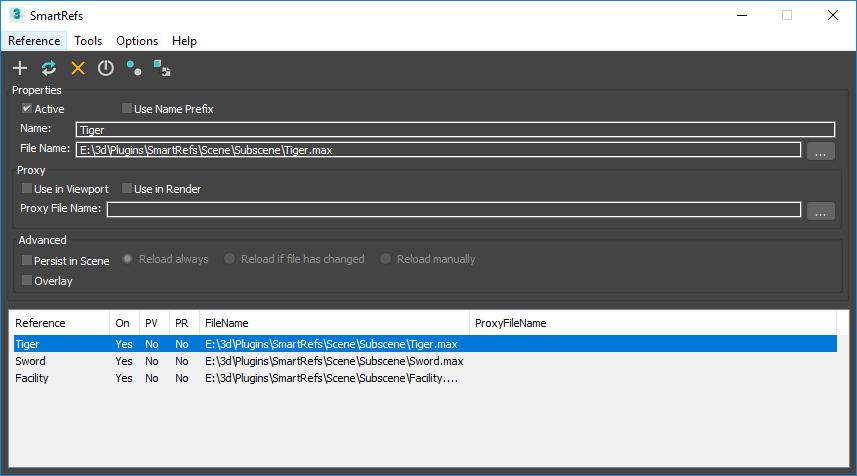
SmartRefs is a new advanced external reference plugin for Autodesk 3ds max. With this tool you can Reference external files but keeping the ability to modify and animate the objects from that reference, in a similar way of the references of Autodesk Maya, but even more advanced.
SmartRefs is more flexible and robust than the classic XRef tool. This tool is designed for artists and teams of any size, to allow them to have a better pipeline where big scenes could be split in several smaller scenes working as a whole in a seamless environment.
The importance of using external references
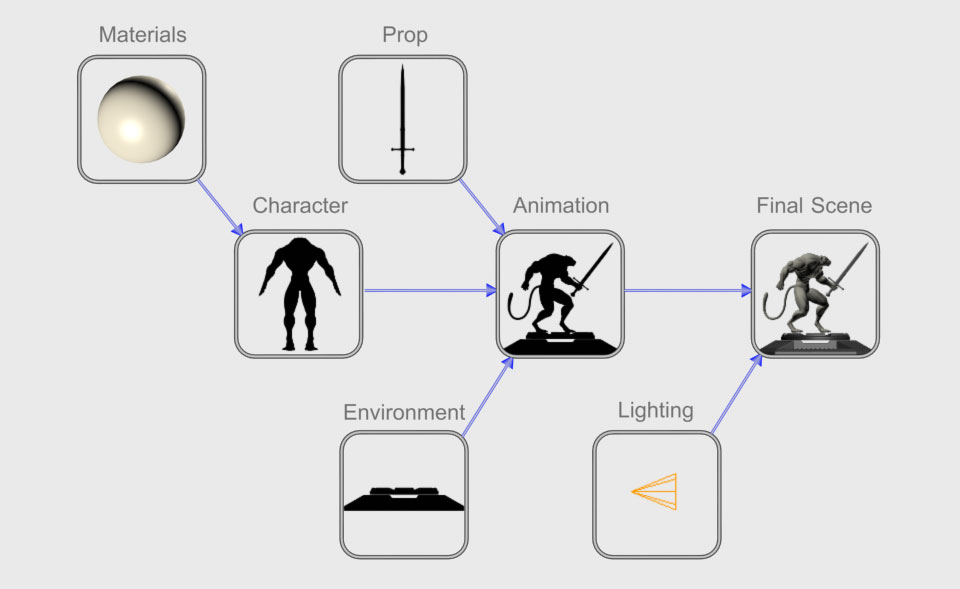
With external references you can use several assets in different scenes all interconnected. For example if you have a character you can use it in 10 different scenes with a different animation in each one, if you need to modify that character you can do it only once in the character source file and the changes are updated automatically in the other 10 scenes.
With the current available tools in 3ds max this is not an easy task and very limited, and in the previous versions it was just impossible.
You can also split several process of the animation pipeline in different interconnected scenes. The lighting artist can work in a different scene than the one that is using the animator, one scene can be connected to the other as a reference, making sure that the animator can’t mess accidentally with the lighting work if he needs to modify the animation.
SmartRefs allows the use of proxy scenes. This is very useful for the animation process, an animator can have a very basic environment in his scene, so it will be faster to load and save. This can be very time saving if the environment has hundreds of models and textures. The final environment with the detailed models and textures will display normally at render time.
With SmartRefs you can:
- Reference external 3ds max files with any kind of objects.
- Modify in any way those referenced Objects in the master scene, even animate them.
- Update the changes made to the referenced files. the modifications made locally are kept.
- A character with rig can be referenced and animated in the master scene.
- A character with Biped or CAT can be referenced and animated in the master scene.
- Animation controllers can be modified, added or deleted. You don’t need to freeze transformations to be able to animate the reference. When reloading the reference the modified controllers will keep the animations, the others will update the modifications made in the reference source file.
- Modifiers can be modified, added or deleted in the master scene.
- Materials can be modified, assigned or removed from objects.
- You can have a reference scene just for materials and use them in any amount of scenes.
- Hierarchies can be modified in the master and referenced files, the changes will be updated in the master scenes. Very useful for making modifications for rigged characters.
- You can have proxies of whole referenced scenes.
- Only modified data will be kept in the master scene, keeping scenes as light as possible
- As an alternative option, referenced objects can be saved in the master scene, so it can be easier to share a file without the hassle of finding and sending several files. When the referenced files are available they can be updated in the master scene automatically.
- References can be nested as much as you need.
- Compatible with most of the popular tools used nowadays with 3ds max like vray and other plugins.
- And much more…
hings that SmartRefs can do and XRefs can’t:
- Update modifications in object properties.
- Update changes in layers.
- Update assigning or removing of materials, with XRefs the materials can only be changed if one was originally assigned.
- Update changes in modifiers, like adding, removing or modifications to the modifiers themselves. The Xref Object only updates changes when they are xref and can not be modified in the master scene.
- Adding of controllers to the list controllers when the transform of the object is frozen.
- Making modifications in the master scene to the materials without merging them. The xRefed materials can only be modified when merged, but in that case modifications to that material can not be updated.
- Referencing Biped without causing troubles. With XRefs 3ds max crashes when a referenced biped changes the numbers of bones in the source file.
- Referencing CAT for animation being also able to add new animation layers and use all of it’s animation functionalities without causing troubles. With XRefs it’s very few the things that you can do with CAT, getting max crashed most of the time.
- Remove objects in the source file. With XRefs Max prompts an error in the master file.
- Make a proxy of the whole scene. With XRefs the proxies can only be assigned by object.
- Update changes in transform of objects that have no frozen transformation.
- Save the referenced objects in the master file.
- Update changes in parenting of objects when one of the referenced object has been parented in the master file.
- Update Object Offset Position/Rotation/Scale.
- Update the wireframe color of the objects.
- Have lighter scenes. For example, if the referenced file has 1000 objects and only one is modified, only that modification is saved in the master file. With Xrefs all the 1000 objects are saved making the file bigger and slow to save and load.
- And much more…